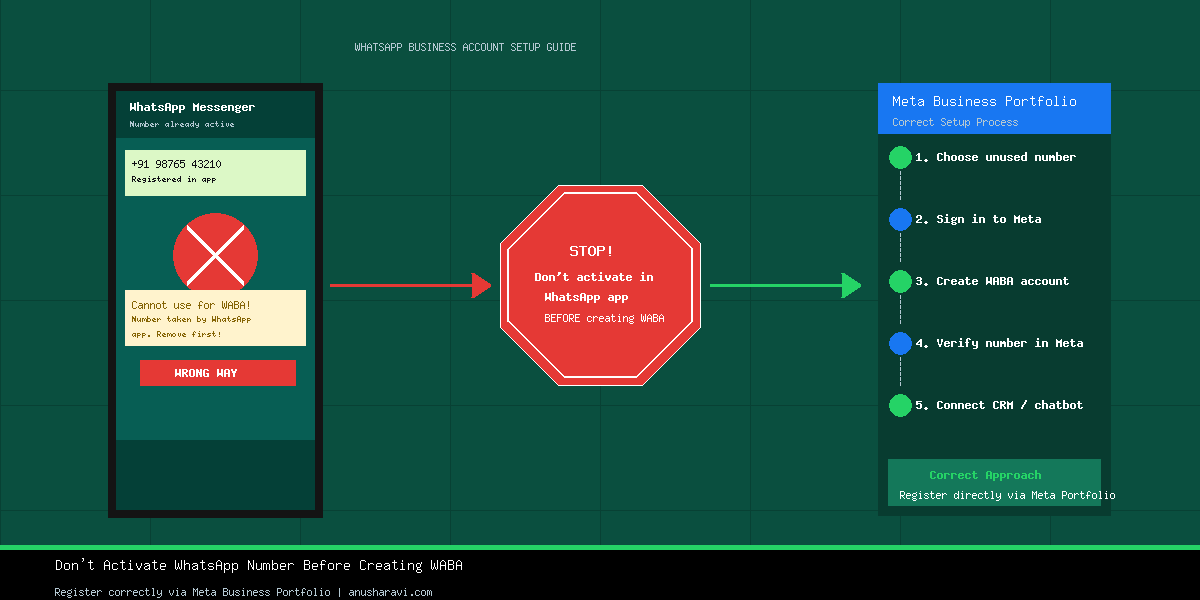
If you’re planning to create a WhatsApp Business Account (WABA) through Meta Business Portfolio, stop for a moment.
A common mistake that many businesses and developers make is activating their phone number in the WhatsApp or WhatsApp Business app before creating a WABA. This can lead to unnecessary complications during the setup process.
In this guide, we’ll explain the correct way to set up your WABA and help you avoid this common mistake.
The Mistake to Avoid
Do not activate your phone number in the WhatsApp Messenger or WhatsApp Business app if you intend to use it for a WhatsApp Business Account (WABA).
Instead, register and verify the phone number directly through Meta Business Portfolio. This is the recommended approach for numbers that will be used with the WhatsApp Business Platform.
Why This Matters
When a phone number is already registered in the WhatsApp app, it may require additional steps before it can be used with the WhatsApp Business Platform.
By registering the number directly in Meta Business Portfolio, you can avoid unnecessary setup issues and complete the process more smoothly.
The Correct Way to Create a WABA
Follow these steps:
- Choose a phone number that is not currently active in WhatsApp Messenger or WhatsApp Business.
- Sign in to your Meta Business Portfolio.
- Create your WhatsApp Business Account (WABA).
- Add and verify your phone number directly in Meta.
- Complete the setup and connect your CRM, chatbot, or application.
Best Practices
- Use a dedicated phone number for your WhatsApp Business Platform.
- Do not activate the number in the WhatsApp mobile app before creating your WABA.
- Register the phone number directly through Meta Business Portfolio.
- Complete the WABA setup before making changes to your business account or phone number.
- Keep your business information accurate and up to date for a smoother verification process.
Frequently Asked Questions
Can I use a phone number that is already active in WhatsApp?
Yes, but it may require migration or additional setup steps before it can be used with the WhatsApp Business Platform. If you’re creating a new WABA, it’s generally easier to use a number that hasn’t been activated in the WhatsApp app first.
Should I activate the number in the WhatsApp Business app first?
No. If your goal is to use the number with the WhatsApp Business Platform, register it directly through Meta Business Portfolio instead of activating it in the mobile app.
What is the easiest way to create a WABA?
Use a new or unused phone number and complete the registration entirely within Meta Business Portfolio. This helps avoid unnecessary complications during setup.
Final Thoughts
A simple mistake — activating your phone number in the WhatsApp app before creating a WhatsApp Business Account (WABA) — can lead to additional steps and delays.
If you’re setting up the WhatsApp Business Platform for your business or your clients, the safest approach is simple:
✅ Don’t activate the phone number in the WhatsApp app.
✅ Register and verify the phone number directly in Meta Business Portfolio.
Following this method will make your WABA setup much smoother. Once your WABA is live, the next priority is making sure your Meta Ads budget is actually converting efficiently — see the full guide to reducing Cost Per Lead with Meta Ads for the exact framework. And if you want to layer retargeting on top of your WhatsApp lead flow, the Meta retargeting guide covers the full audience stack.
Found This Helpful?
Get a free audit of your Meta or Google Ads account. Anusha will review your campaigns and give you a clear action plan to cut CPL and grow ROAS.
Book Free Audit →Limited slots · No agency fees · Just a clear action plan